Where the human approval step belongs in an AI finance workflow
Put the human gate on actions that leave the building, not on every line the AI reads. A practical map for small finance teams.
It is the last week of the month. The AP inbox has a stack of supplier invoices, two of them from a vendor who emailed last Tuesday to say their bank account has changed. Someone on your team will match each invoice to a purchase order, check the goods arrived, key it into the ledger and queue the payment. You bought an AI tool in the spring to do exactly this. It is still in pilot, because nobody could agree on what it was allowed to do on its own.
That disagreement is the real blocker in most small finance teams. The technology to read an invoice and propose a match is mature. What is missing is a clear answer to one question: where does a person have to say yes before anything happens? Get that answer right and the rest of the automation becomes easy to trust. Get it wrong and you end up with either a tool nobody lets run, or a tool that pays the wrong account.
What human in the loop means on your own books
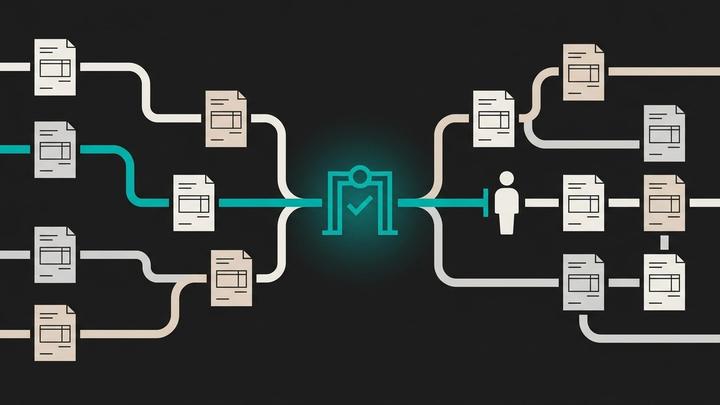
Vendors describe human in the loop as a governance framework, with tiers and escalation matrices. For a team of three to ten people it is simpler than that. The AI does the work up to a decision. A named person makes the decision. The system records who decided what, and when.
We ran this rebuild on our own finance operation at Winvesta before offering it to anyone else, and the lesson that stuck was about placement. A gate in the wrong spot is worse than no gate: people learn to click approve without reading, and the control exists only on paper.
The rule: gate the action, not the analysis
Split every finance workflow into two kinds of step. Analysis steps read, extract, match, categorise and draft. They change nothing in the outside world, and if the AI gets one wrong, the next step catches it. Action steps have consequences outside the system: money leaves an account, a supplier record changes, a customer receives an email, the ledger moves.
Let the AI run analysis steps without asking anyone. Put a human approval in front of every action step. That one rule settles most of the arguments about what the AI may do, because it turns a vague question about trust into a concrete question about consequences.
Four places the gate belongs
Here is how the rule plays out across the workflows a small finance team runs every month.
| Workflow | What the AI does on its own | What a person approves | Why the gate sits there |
|---|---|---|---|
| Supplier invoices | Reads the invoice, matches it to the PO and goods receipt, flags mismatches | The payment run | Money leaves the account and is hard to recover |
| Vendor master data | Spots a change in bank details and pulls the supporting email | Any change to where a supplier is paid | A changed bank account is the classic invoice fraud route |
| Collections | Ranks overdue invoices and drafts reminder emails | Each email before it is sent | It speaks to your customer in your name |
| Month-end close | Reconciles accounts and proposes journals with the evidence attached | Posting the journals | It changes the numbers the board and auditors rely on |
Notice what is not on the list. Nobody approves the extraction of a PDF, the categorisation of a bank line or the first draft of a reconciliation. Those are the steps that consume the hours, and they are the steps the AI should own.
Where teams put the gate wrong
Approving every line
If the approver has to confirm each invoice match one by one, the tool saves typing but not attention. After a week the approvals become reflexive. Approve the payment run as a batch, with exceptions pulled to the top, and make the person read those.
Approving too late
Some setups let the AI post to the ledger and ask for sign-off afterwards. By then the entry is in the books and the review turns into a correction exercise. The approval has to sit before the action, never after it.
Leaving master data ungated
Teams gate payments carefully and then let an automation update supplier bank details from an email. That skips the one control that matters most. A bank detail change should always need a person, and ideally a call-back to a number you already hold for that supplier, not the one in the email.
What the approver should see
A good approval screen answers three questions without the approver opening another tab: what is being proposed, what evidence supports it, and what the AI was unsure about. For an invoice that means the invoice image, the matched PO and receipt, and any field that did not match, highlighted. For a reminder email it means the draft, the invoice history and the last reply from the customer.
Give the approver three buttons, not two: approve, reject, and edit then approve. The edits are the most valuable data you will collect, because they show exactly where the AI's judgement differs from your team's.
Review by exception once the record earns it
After a few cycles you will have a history of approvals and edits for each workflow. Where a category of action has been approved unchanged cycle after cycle, you can move it from approve-each to review-after: the action runs, and a person reviews a sample and every exception. Make that move one category at a time, based on your own approval history rather than a vendor's accuracy claim, and write the decision down.
Some actions should never make that move. New suppliers, bank detail changes, payments above a threshold you set, and anything touching tax filings stay approve-each for good. The threshold is yours to pick. The point is to pick it deliberately and record it where your auditor can find it.
How we can help
At Winnit we rebuild a finance, marketing or support operation around this pattern: the AI does the reading and drafting inside your systems, and a person on your team approves anything that goes out. At handover you keep the code, the documentation and the training. We do not replace your accountant or your auditor, and we will not remove the approvals that protect your cash. If your AI tools are sitting in pilot because nobody agreed on the gates, that is the conversation to have with us.
Frequently asked questions
What does human in the loop mean in accounts payable?
The AI reads invoices, matches them to purchase orders and goods receipts, and prepares the payment run. A named person on the finance team approves the payment run and any change to supplier bank details before anything is paid.
Should a person approve every invoice the AI processes?
No. Approving every line leads to reflexive clicking. Approve the payment run as a batch with mismatches and exceptions pulled to the top, and make sure the approver reads those.
Which finance actions should always need human approval?
Paying suppliers, changing where a supplier is paid, adding a new supplier, posting journals at month end, sending emails to customers, and anything that feeds a tax filing.
When can we move from approving each action to reviewing afterwards?
When your own approval history shows a category of action being approved unchanged cycle after cycle. Move one category at a time, keep sampling it, and record the decision.
Do we need a specialist tool to add approval gates?
Not necessarily. Decide first where the gates sit and what the approver sees. Then check whether the systems you already own can pause a workflow and wait for a person before you buy anything new.